Atoms
DHT11 Temperature and Humidity Sensor Module
Overview
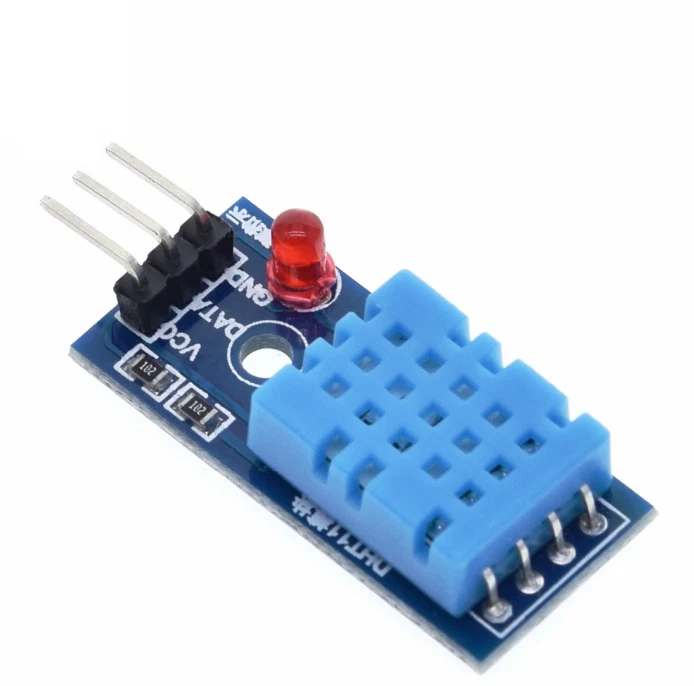
DHT11 Temperature and Humidity Sensor Module with adapter board, indicator LED, and cable. A ready-to-use digital sensor module featuring the DHT11 sensor pre-mounted on a PCB with pull-up resistor, power LED indicator, and 3-pin connector cable. Eliminates the need for external components — simply plug in and start reading temperature and humidity data. Fully compatible with Arduino, ESP32, STM32, Raspberry Pi, and all microcontroller platforms.
Specifications
| Parameter | Value |
|---|---|
| Model | DHT11 Adapter Module |
| Sensor | DHT11 |
| Measurement | Temperature + Humidity |
| Temperature Range | 0°C – 50°C |
| Temperature Accuracy | ±2°C |
| Humidity Range | 20% – 90% RH |
| Humidity Accuracy | ±5% RH |
| Resolution | 1°C / 1% RH |
| Supply Voltage | 3.3V – 5V |
| Output | Single-wire digital signal |
| Sampling Rate | 1 reading per second (1Hz) |
| Cable Length | ~20cm (3-pin connector) |
| Onboard LED | Power indicator |
| PCB | Adapter board with pull-up resistor |
| Operating Temperature | 0°C to +50°C |
| Storage Temperature | -20°C to +60°C |
Module Components
| Component | Description |
|---|---|
| DHT11 Sensor | Temperature + humidity sensing element |
| Pull-up Resistor | 10kΩ onboard — no external resistor needed |
| Power LED | Indicates module is powered |
| 3-pin Connector | VCC, DATA, GND with cable |
| PCB Adapter | Clean mounting and easy wiring |
Pin Configuration
| Pin | Color | Description |
|---|---|---|
| VCC | Red | 3.3V or 5V power |
| DATA | Yellow | Digital data output |
| GND | Black | Ground |
Wiring (Arduino)
| DHT11 Module | Arduino |
|---|---|
| VCC | 5V |
| DATA | Pin 2 (any digital pin) |
| GND | GND |
Wiring (ESP32)
| DHT11 Module | ESP32 |
|---|---|
| VCC | 3.3V |
| DATA | GPIO4 (any GPIO) |
| GND | GND |
Wiring (Raspberry Pi)
| DHT11 Module | Raspberry Pi |
|---|---|
| VCC | 3.3V (Pin 1) |
| DATA | GPIO4 (Pin 7) |
| GND | GND (Pin 6) |
Features
- Ready to use — no external components needed
- Onboard pull-up resistor — plug and play operation
- Power LED indicator — confirm module is powered
- 3-pin cable included — easy connection to breadboard or PCB
- Single wire digital output — simple 1-wire protocol
- Low power consumption — ideal for battery projects
- Compact adapter board — easy PCB mounting
- Stable readings — onboard filtering and conditioning
- Wide voltage range — works at 3.3V and 5V
Recommended Libraries
- Arduino:
DHT sensor libraryby Adafruit - ESP32/ESP8266:
DHT sensor libraryby Adafruit - Python (RPi):
Adafruit_DHT - Install via Arduino IDE: search
DHT sensor library
Arduino Code Example
#include <DHT.h>

#define DHTPIN 2
#define DHTTYPE DHT11

DHT dht(DHTPIN, DHTTYPE);

void setup() {
  Serial.begin(9600);
  dht.begin();
  Serial.println("DHT11 Module Ready");
}

void loop() {
  delay(2000); // Wait 2 seconds between readings

  float humidity = dht.readHumidity();
  float temperature = dht.readTemperature();

  if (isnan(humidity) || isnan(temperature)) {
    Serial.println("Failed to read from DHT11!");
    return;
  }

  Serial.print("Temperature: ");
  Serial.print(temperature);
  Serial.println(" °C");

  Serial.print("Humidity: ");
  Serial.print(humidity);
  Serial.println(" %");
}
ESP32 Code Example
#include <DHT.h>

#define DHTPIN 4
#define DHTTYPE DHT11

DHT dht(DHTPIN, DHTTYPE);

void setup() {
  Serial.begin(115200);
  dht.begin();
}

void loop() {
  delay(2000);
  float h = dht.readHumidity();
  float t = dht.readTemperature();

  Serial.printf("Temp: %.1f°C  Humidity: %.1f%%\n", t, h);
}
DHT11 vs DHT22 Comparison
| Feature | DHT11 | DHT22 |
|---|---|---|
| Temperature Range | 0–50°C | -40–80°C |
| Temp Accuracy | ±2°C | ±0.5°C |
| Humidity Range | 20–90% | 0–100% |
| Humidity Accuracy | ±5% | ±2% |
| Sampling Rate | 1Hz | 0.5Hz |
| Price | Lower | Higher |
| Best For | Indoor basic use | Precision measurement |
⚠️ Notes
- Minimum 2 second delay between readings — sensor needs time to stabilize
- Do not place near heat sources — affects temperature accuracy
- Indoor use only — not suitable for outdoor or harsh environments
- Humidity range 20–90% — readings outside this range unreliable
- Check for NaN in code — sensor occasionally returns invalid data
- Keep cable short — long cables can cause signal interference
- Avoid condensation — high humidity environments may damage sensor
Applications
- Indoor temperature and humidity monitoring
- Weather station projects
- Greenhouse and plant monitoring
- HVAC control systems
- Smart home automation
- Air quality monitoring
- Baby room climate control
- Server room temperature alerts
- Arduino and ESP32 learning projects
- IoT sensor node development
$1.00$0.75Save $0.25
៛3,000
20 in stock
Quantity
1
🚚
Fast Shipping
Phnom Penh & provinces
↩️
7 Day Returns
Hassle-free returns